Diagram
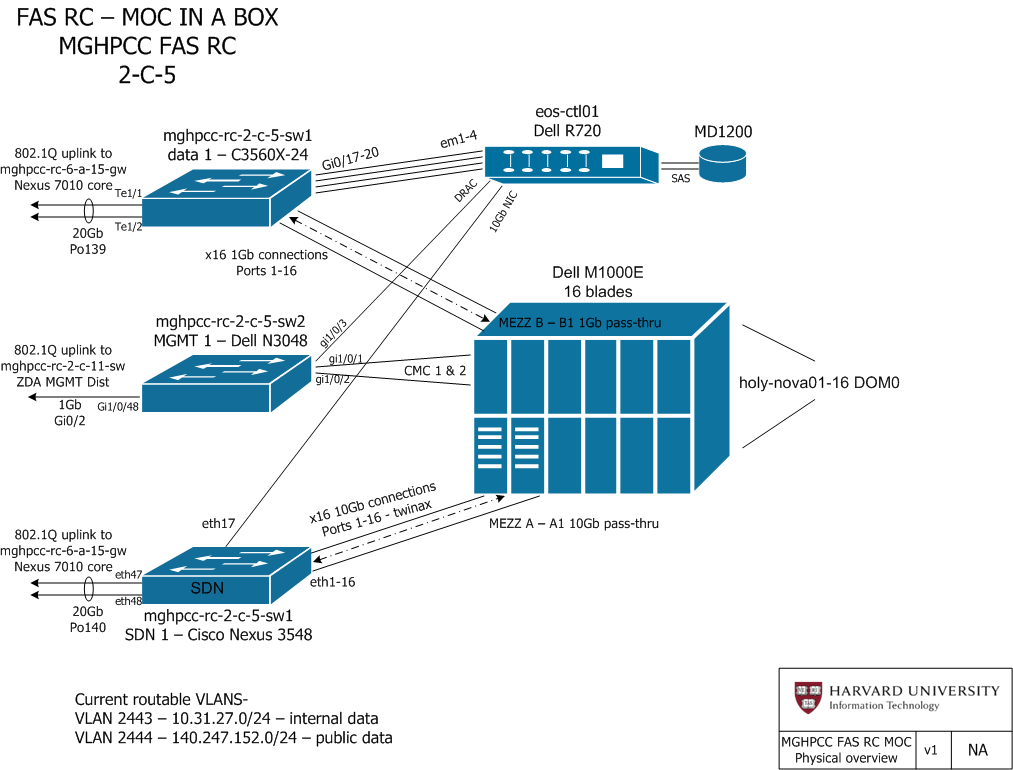
The R720, eosctl01, connects to sw1 over em1-em4, and to sw3 over p3p1 (p3p2 is disconnceted). The 16 blades connect to sw1 over p3p1 and to sw3 over em1 (em2 and p3p1 are disconnected).
MOC Network Topology
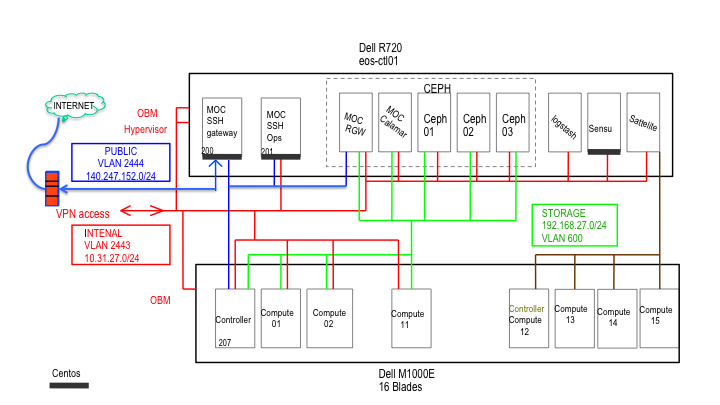
Engagement Journal
[Link](../_static/pdf/MOC OpenStack_Ceph_Satellite Engagement Journal - November 2014_v1.2.pdf)
Testing Openstack
openstack_test.sh
export OS_USERNAME=george_test
export OS_TENANT_NAME=george_test
export OS_PASSWORD=testtesttest
export OS_AUTH_URL=http://140.247.152.207:35357/v2.0/

# Open up Neutron enough to test connectivity
N_RULE1=$(neutron security-group-rule-create --protocol icmp --direction ingress default | grep ' id ' | awk '{print $4}')
N_RULE2=$(neutron security-group-rule-create --protocol tcp --port-range-min 22 --port-range-max 22 --direction ingress default | grep ' id ' | awk '{print $4}')

# Create a SSH keypair
nova keypair-add testkey > /tmp/testkey.pem
chmod 600 /tmp/testkey.pem

# Capture IDs
PUBNETID=$(neutron net-list | grep pubnet | awk '{print $2}')

#Creating Internal L2 private networks
#Internal-only router to connect multiple L2 networks privately.
PRIVNET1ID=$(neutron net-create privnet1 | grep ' id ' | awk '{print $4}')
PRIVSUBNET1ID=$(neutron subnet-create --name privsubnet1 $PRIVNET1ID 172.16.25.0/24 | grep ' id ' | awk '{print $4}')
# Set gateway for your external network
neutron router-gateway-set $ROUTERID $PUBNETID

### Launch an instance...
CIRROSID=$(glance image-list | grep -i cirros | awk '{print $2}')
INSTANCEID=$(nova boot testserver --flavor 1 --image $CIRROSID --key-name testkey --security-groups default --nic net-id=$PRIVNET1ID | grep ' id ' | awk '{print $4}')
FLOATINGIP=$(neutron floatingip-create pubnet1 | grep floating_ip_address | awk '{print $4}')
nova add-floating-ip $INSTANCEID $FLOATINGIP

#   VOLUMEID=$(cinder create 2 | grep ' id ' | awk '{print $4}')
sleep 5
#   nova volume-attach $INSTANCEID $VOLUMEID
echo Test server at ${FLOATINGIP} now.  There should be a volume attached.
bash

#   nova volume-detach $INSTANCEID $VOLUMEID
#   cinder delete $VOLUMEID

nova delete $INSTANCEID
# HERE:  should test booting from a volume, snapshotting a VM and booting from the snapshot, snapshotting a volume potentially.
nova delete $INSTANCEID
# HERE:  should test booting from a volume, snapshotting a VM and booting from the snapshot, snapshotting a volume potentially.

#  VOLUMEID=$(cinder create --image-id $CIRROSID 1 | grep ' id ' | awk '{print $4}')
#  sleep 5
#  INSTANCEID=$(nova boot testserver --flavor 1 --boot-volume $VOLUMEID --key-name testkey --security-groups default --nic net-id=$PRIVNET1ID | grep ' id ' | awk '{print $4}')
#  nova add-floating-ip $INSTANCEID $FLOATINGIP
#  sleep 5
#  echo Test server at ${FLOATINGIP} now.
#  bash
#  nova delete $INSTANCEID
#  sleep 10
#  cinder delete $VOLUMEID

FLOATINGIP_ID=$(neutron floatingip-list | grep $FLOATINGIP | awk '{print $2}')
neutron floatingip-delete $FLOATINGIP_ID


neutron router-gateway-clear $ROUTERID
neutron router-interface-delete $ROUTERID $PRIVSUBNET1ID
neutron router-delete $ROUTERID
neutron subnet-delete $PRIVSUBNET1ID
neutron net-delete $PRIVNET1ID

neutron security-group-rule-delete $N_RULE1
neutron security-group-rule-delete $N_RULE2

HEATSTACK=$(heat stack-create -f george.yaml -P 'key_name=testkey;image='$CIRROSID';private_net_name=borr;public_net_id='$PUBNETID borr2 | grep borr2 | awk '{print $2}')
echo 'Test your heat stack now'
bash
heat stack-delete $HEATSTACK

nova keypair-delete testkey
rm /tmp/testkey.pem

echo 'Done!!'
george.yaml
heat_template_version: 2013-05-23

description: >
  HOT template to create a new neutron network plus a router to the public
  network, and for deploying two servers into the new network. The template also
  assigns floating IP addresses to each server so they are routable from the
  public network.

parameters:
  key_name:
    type: string
    description: Name of keypair to assign to servers
    constraints:
      - custom_constraint: nova.keypair
  image:
    type: string
    description: Name of image to use for servers
    constraints:
      - custom_constraint: glance.image
  flavor:
    type: string
    description: Flavor to use for servers
    default: m1.small
    constraints:
      - custom_constraint: nova.flavor
  public_net_id:
    type: string
    description: >
      ID of public network for which floating IP addresses will be allocated
    constraints:
      - custom_constraint: neutron.network
  private_net_name:
    type: string
    description: Name of private network to be created
  private_net_cidr:
    type: string
    description: Private network address (CIDR notation)
    default: 192.168.4.0/24
  private_net_gateway:
    type: string
    description: Private network gateway address
    default: 192.168.4.1
  private_net_pool_start:
    type: string
    description: Start of private network IP address allocation pool
    default: 192.168.4.2
  private_net_pool_end:
resources:
  private_net:
    type: OS::Neutron::Net
    properties:
      name: { get_param: private_net_name }

  private_subnet:
    type: OS::Neutron::Subnet
    properties:
      network_id: { get_resource: private_net }
      cidr: { get_param: private_net_cidr }
      gateway_ip: { get_param: private_net_gateway }
      allocation_pools:
        - start: { get_param: private_net_pool_start }
          end: { get_param: private_net_pool_end }

  router:
    type: OS::Neutron::Router

  router_gateway:
    type: OS::Neutron::RouterGateway
    properties:
      router_id: { get_resource: router }
      network_id: { get_param: public_net_id }

 router_interface:
    type: OS::Neutron::RouterInterface
    properties:
      router_id: { get_resource: router }
      subnet_id: { get_resource: private_subnet }

  server1:
    type: OS::Nova::Server
    properties:
      name: Server1
      image: { get_param: image }
      flavor: { get_param: flavor }
      key_name: { get_param: key_name }
      networks:
        - port: { get_resource: server1_port }

  server1_port:
    type: OS::Neutron::Port
    properties:
      network_id: { get_resource: private_net }
      fixed_ips:
        - subnet_id: { get_resource: private_subnet }

 server1_floating_ip:
    type: OS::Neutron::FloatingIP
    properties:
      floating_network_id: { get_param: public_net_id }
      port_id: { get_resource: server1_port }

  server2:
    type: OS::Nova::Server
    properties:
      name: Server2
      image: { get_param: image }
      flavor: { get_param: flavor }
      key_name: { get_param: key_name }
      networks:
        - port: { get_resource: server2_port }

  server2_port:
    type: OS::Neutron::Port
    properties:
      network_id: { get_resource: private_net }
      fixed_ips:
        - subnet_id: { get_resource: private_subnet }
 server2_floating_ip:
    type: OS::Neutron::FloatingIP
    properties:
      floating_network_id: { get_param: public_net_id }
      port_id: { get_resource: server2_port }

outputs:
  server1_private_ip:
    description: IP address of server1 in private network
    value: { get_attr: [ server1, first_address ] }
  server1_public_ip:
    description: Floating IP address of server1 in public network
    value: { get_attr: [ server1_floating_ip, floating_ip_address ] }
  server2_private_ip:
    description: IP address of server2 in private network
    value: { get_attr: [ server2, first_address ] }
  server2_public_ip:
    description: Floating IP address of server2 in public network
    value: { get_attr: [ server2_floating_ip, floating_ip_address ] }
How To Test Harvard Moc Cluster
This document is a description of the MOC OpenStack cluster configuration being hosted at Harvard.
This infrastructure will serve to support MOC development and production purposes. It is being done using puppet and other automation technologies so that it can be reproduced in VMs or on other nodes.
How do I get in?
We have a VM (on eos-ctl01), moc-ssh-gateway, that you can SSH to, at 140.247.152.200. (You can get an account on this machine if you contact us. Please note that we are ONLY allowing public key authentication.) From there you can reach the Openstack dashboard at 140.247.152.207.
Psst… I want to get at internals that shouldn’t be exposed to the public internet!
There is a second VM, moc-ssh-backdoor, that is on both the public network and the private network, located at 140.247.152.201. You can reach it if you’re on moc-ssh-gateway. This machine should generally not be on! You can ask for an account on this machine, but unless you have a really good reason, you’re not going to get one.
Redhat Contacts
- dcritch@redhat.com - David Critch
- jjozwiak@redhat.com - Jon Jozwaik
Nodes
We have a Dell R720 with 12 TB of storage, and 16 Dell M620 smaller blades. The R720 is running a large number of VMs for various purposes:
- Red Hat Satellite (controls and deploys most other nodes)
- 3 Ceph nodes (storage; managed by but not deployed by Satellite)
- Calamari (manages Ceph; managed by but not deployed by Satellite)
- Rados (Gateway for Ceph, implementing Swift (and Cinder?) interfaces; deployed with Satellite)
- SSH Gateway
- ELK-stack (elastic search, logstash, kabana, for logging and searching logs)
- Sensu (for monitoring)
Physical node roles include:
- One OpenStack controller, hosting management for: Nova, Neutron, (others?)
- 15 OpenStack compute nodes
16 nodes total, hence the 16 Dell M620 blade servers.
Second cluster set up:
We carved out 4 compute nodes, computer12 to computer15 for a second Openstack deployment - without Ceph. The remaining twelve compute nodes remain as part of the existing cluster with Openstack and Ceph deployment described in the [Redhat Engagement Journal]. More details on this second cluster is in the Dev Cluster section below.
Networks
This configuration differs from many production deployments in that we won’t be using separate physical NICs to host each data type (storage, management, user), and are instead multiplexing those streams using 802.1Q (except for production management traffic). Because of this, there is a little extra complication in setting everything up discussed later.
Each node has 2 NICs that we will be using:
- A 1G interface, running in access mode. This will be used for accessing Satellite, PXE, and for the production cluster, management traffic.
- A 10G interface, running in 802.1Q mode. This will house traffic for: storage (VLAN 600) and tenant networks (VLANs 100-599). For non-production clusters, this will also host management traffic (dubious—discuss. We can’t deploy Openstack with Satellite onto a node with only one nic).
OpenStack will use native VLANs for user networks. This shouldn’t be a limitation in the near-term as Harvard has allocated 501 to the MOC.
Configuring
Because we have only one machine with storage, we are not running Swift. Instead, we provisioned 3 Ceph VM on the R720 (managed by a VM running Calamari), and are using Rados in front of it to provide Swift (and Cinder?).
Networking
First, we need to configure the tagged interfaces. In the future, this should be handled by puppet on top of the OVS switch. To do this manually, we need to log into the node and:
- Disable network manager. “systemctl disable NetworkManager”
- Enable network. “systemctl enable network”
- Configure our tagged interfaces.
- In /etc/sysconfig/network-scripts, create a new file for the tagged network. ie- “ifcfg-br-ex.1000”
TYPE=Ethernet
BOOTPROTO=static
DEVICE=br-ex.1000
NAME=br-ex.1000
ONBOOT=yes
IPADDR=...
NETMASK=...
MTU=9000
Dev Cluster
- We want a dev environment, where we can potentially split the 16 node cluster into 2, 8-node portions
- In the separate dev environment
- We’ll put the management network on a separate 10G VLAN.
- Separate all services into separate IP address ranges to prevent any potential conflict with the production.
- The 1 IP we need to route to is the meta-controller.
- We won’t use the 1GB interface on the dev env except to boot into PXE
To configure a dev cluster:
- Through Satellite, clone the puppet config
- Change the IPs
- Change the interfaces. Every network should be tagged, since it’s on the 10G
- Configure the interfaces such that 10G has a bridge to VLAN 2444.
- Need to assign a static IP.
Host names
Everything is under the moc.rc.fas.harvard.edu subdomain. You must be VPN’d in to access this subdomain.
###Machines:
- The R720 head machine, running vms is at eos-ctl01.rc.fas.harvard.edu - 10.31.27.200
- The controller is controller.rc.fas.harvard.edu - 10.31.27.207
- The compute nodes follow the convention of compute01.rc.fas.harvard.edu, with 01 substituted by the number
- The switch that we have access to is at mghpcc-rc-2-c-5-sw3 - 10.31.29.126, username mocadmin
###OBMs:
- the r720 obm is at eos-ctl01-obm.rc.fas.harvard.edu
- chassis cmc is chassis2c051-cmc-obm.rc.fas.harvard.edu
- blade obm’s are holy-nova2c05101-obm.rc.fas.harvard.edu .. up to 16 for last 2 digits
###VMs:
- Satellite is at moc-sat.rc.fas.harvard.edu - 10.31.27.201
- MOC-logstash is at 10.31.27.152
- Moc-sensu-centOS is at 10.31.27.157
Current issues
- Need to puppetize ceph and calamari deployment, have to manually deploy before installing nodes atm
- SSL currently disabled (we think just Horizon uses)… didn’t have an SSL cert to supply
- Had to manually create SSL certs on control for both horizon and AMQ
- Puppet is overriding a rabbitmq parameter that is setting SSL use as true, because it is missing a parameter in this version. As a temporary workaround we will run puppet appy on the nodes, then disable puppet, and set this parameter as true in the related files through sed. The command is listed in Jon’s doc
- Sensu is set up, but actually doing anything. See Things to monitor with Sensu
Boot NICs
Satellite keeps resetting the mac address of nodes to the wrong value – to re-provision you need to first correct the mac address. Here’s a list of the ones we’ve collected manually (by booting the machine and watching the console):
B8:2A:72:4F:A3:E1 - compute12
B8:2A:72:4F:A3:FB - compute14
If a machine isn’t in this list, please add it once you’ve found the mac the hard way.
Note that we hope this is solved for the future (see the ops log), but it’s too early to say.
Table of IP addresses
ssh-gateway                 140.247.152.200
ssh-backdoor 10.31.27.225   140.247.152.201

sensu        10.31.27.157
logstash     10.31.27.152

controller   10.31.27.207   140.247.152.207   192.168.27.207

compute01    10.31.27.208                     192.168.27.208
compute02    10.31.27.209                     192.168.27.209
compute03    10.31.27.210                     192.168.27.210
compute04    10.31.27.211                     192.168.27.211
compute05    10.31.27.212                     192.168.27.212
compute06    10.31.27.213                     192.168.27.213
compute07    10.31.27.214                     192.168.27.214
compute08    10.31.27.215                     192.168.27.215
compute09    10.31.27.216                     192.168.27.216
compute10    10.31.27.217                     192.168.27.217
compute11    10.31.27.218                     192.168.27.218
compute12    10.31.27.219                     192.168.27.219
compute13    10.31.27.220                     192.168.27.220
compute14    10.31.27.221                     192.168.27.221
compute15    10.31.27.222                     192.168.27.222

eos-ctl01    10.31.27.11
moc-sat      10.31.27.201
moc-calamari 10.31.27.205
moc-ceph01   10.31.27.202                     192.168.27.202
moc-ceph02   10.31.27.203                     192.168.27.203
moc-ceph03   10.31.27.204                     192.168.27.204
moc-mon      10.31.27.206
moc-rgw      10.31.27.223   140.247.152.223   192.168.27.223
moc-rgw-2    10.31.27.224   140.247.152.224   192.168.27.224
Endpoint list
# keystone endpoint-list
+----------------------------------+-----------+---------------------------------------------------+------------------------------------------------+-------------------------------------------+----------------------------------+
|                id                |   region  |                     publicurl                     |                  internalurl                   |                  adminurl                 |            service_id            |
+----------------------------------+-----------+---------------------------------------------------+------------------------------------------------+-------------------------------------------+----------------------------------+
| 33cdf630718a4416825af4e1ebf69d5d | RegionOne |    http://140.247.152.207:8776/v1/%(tenant_id)s   |   http://10.31.27.207:8776/v1/%(tenant_id)s    | http://10.31.27.207:8776/v1/%(tenant_id)s | 8890ae070ac6454abbe83e25c31686a2 |
| 4ef375e848604c7dbb54648d47099cdc | RegionOne |          http://140.247.152.207:5000/v2.0         |         http://10.31.27.207:5000/v2.0          |       http://10.31.27.207:35357/v2.0      | d2ad3da3ff7545b3a94fdd9144ac952a |
| 73e93f2155eb41e7b7c98406a68a13be | RegionOne |     http://140.247.152.207:8773/services/Cloud    |    http://10.31.27.207:8773/services/Cloud     |  http://10.31.27.207:8773/services/Admin  | 93f50d038efb474dabca4e7a9a1be9df |
| 756e8945c971464ca61e76aa1bd2400b | RegionOne | http://140.247.152.207:8080/v1/AUTH_%(tenant_id)s | http://10.31.27.207:8080/v1/AUTH_%(tenant_id)s |         http://10.31.27.207:8080/         | 9e55e68884a848deaab46182b448e343 |
| 75f8d2353d764d6ba40143ef4513ac67 | RegionOne |            http://140.247.152.207:8386/           |           http://10.31.27.207:8386/            |         http://10.31.27.207:8386/         | 89e39e4304434254bc132d03a4ac2c48 |
| 7d051afba0b844498d3f84156f832c90 | RegionOne |            http://140.247.152.207:9292            |            http://10.31.27.207:9292            |          http://10.31.27.207:9292         | f4631c78ced94893ab5f28ffd179faee |
| 8e1131b2983e4748aacd6fc5a3410604 | RegionOne |            http://140.247.152.207:8080            |            http://10.31.27.207:8080            |          http://10.31.27.207:8080         | 338b211240c443148bd310271c1d46b7 |
| 956b4f2ad7e948829d4577840639128d | RegionOne |    http://140.247.152.207:8004/v1/%(tenant_id)s   |   http://10.31.27.207:8004/v1/%(tenant_id)s    | http://10.31.27.207:8004/v1/%(tenant_id)s | 1af4340f6e13413ca2a37cadb1ebc98b |
| b16938a762ca462f833ec288b733989d | RegionOne |    http://140.247.152.207:8776/v2/%(tenant_id)s   |   http://10.31.27.207:8776/v2/%(tenant_id)s    | http://10.31.27.207:8776/v2/%(tenant_id)s | ff2dc15e3bac41eda0312897edd909ee |
| b876ebbc0d404a89abd6216c2de2729c | RegionOne |            http://140.247.152.207:9696/           |           http://10.31.27.207:9696/            |         http://10.31.27.207:9696/         | 319579f6d2ba45279158fafff23beeb2 |
| c210d284ab8845bba86ed835933feb5f | RegionOne |            http://140.247.152.207:8777            |            http://10.31.27.207:8777            |          http://10.31.27.207:8777         | 9e128b6926b048a986acb6d4b09071c3 |
| cd0e393bbb90458da392bfd367d108a4 | RegionOne |    http://140.247.152.207:8774/v2/%(tenant_id)s   |   http://10.31.27.207:8774/v2/%(tenant_id)s    | http://10.31.27.207:8774/v2/%(tenant_id)s | d7b352e546f84aba874e286acc656756 |
| fff6e8885721438b9a31098f8ff988f9 | RegionOne |          http://140.247.152.207:8000/v1/          |          http://10.31.27.207:8000/v1/          |        http://10.31.27.207:8000/v1/       | 9abb55fb157843c2b6941635132cd8ac |
+----------------------------------+-----------+---------------------------------------------------+------------------------------------------------+-------------------------------------------+----------------------------------+