Misc Errors/Problems
Re-sizing root partition, removing /var/nova/instances
In order to get the full disk on the root partition, follow the steps below:
All mounting and remove - resize operations must be done as root
You should see two partitions, a vg_moc-root and vg_moc-lv_instances
$ lvdisplay
Make sure there is no data stored in /var/nova/instances BEFORE you unmount it
$ umount /dev/mapper/vg_moc-lv_instances
This next step deletes the old lv, so only do this if there is no data left in the partition
$ lvremove /dev/mapper/vg_moc-lv_instances
Next, resize the remaining partition and grow the filesystem to match the new space
$ lvresize -l +100%FREE /dev/mapper/vg_moc-lv_root
$ xfs_growfs /dev/mapper/vg_moc-lv_root
Check that the change worked, and we only have one large root partition
$ lvdisplay
Node 39 crashes
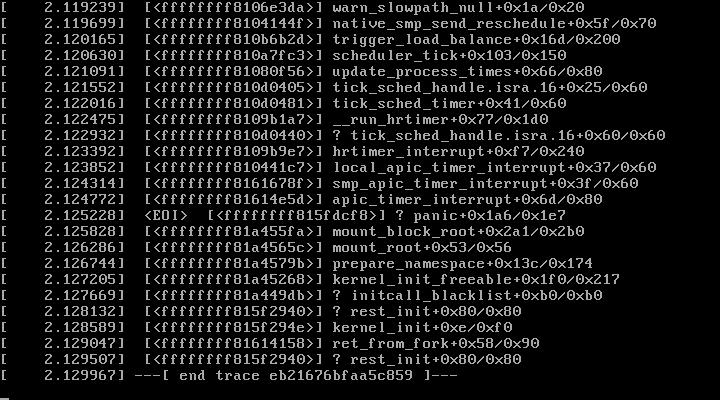
Possible solution (Yue) We will rebuild this node with RHEL7.1.
- Rebuild the Nodes from the Foremen.
https://192.168.122.162/users/login(see bitwarden Foreman passowrd) - Go to the 39 host and click build on the top .
https://192.168.122.162/hosts/compute-39.moc.ne.edu - Go to the Haas Master and log in to
https://10.99.1.139/to install the RHEL (User/Password: see bitwarden HaaS Master password) - Launch KVM console (you need to install icedtea and jdk before that)
- Warm boot
- LSCI / Disable EFI change the boot sequence to 8200 or 600 at the first and 400 at the second.
- Clear the configurations from RAID
- Configuration -> Clear Configuration -> Yes
Ceph-Iscsi Issue
This turned out to be conflicting IP addresses. Compute nodes were programmatically being assigned IPs on the Ceph network
based on their number, e.g. compute-20 was at 192.168.28.20.
However, 192.168.28.{11-14} were already taken by the four storage nodes of the Fujitsu appliance, so computes 11, 12, 13, and 14 caused conflict.
A useful trick from Peter: In case of IP conflicts, you need to run arp -d <ipaddress> on the relevant nodes
before testing fixes, otherwise the arp cache contents might make it look as if your fix has not worked.